Tsumo Dragon · Player Support

Support

Answers for gameplay, saved games, purchases, audio, and accessibility. Your hand stays yours; we help with everything around it.

QUICK ANSWERS

Start with the essentials

The most common questions, kept short and practical.

How a game works

Choose one tile to discard, improve shanten and useful tiles, then reach a legal win within 30 turns.

Continue a saved game

An active game is saved automatically on this device. Use Continue on the home screen to resume without using another free game.

Full Game purchase

The first 10 games are complete and free. One non-consumable purchase permanently removes the game limit.
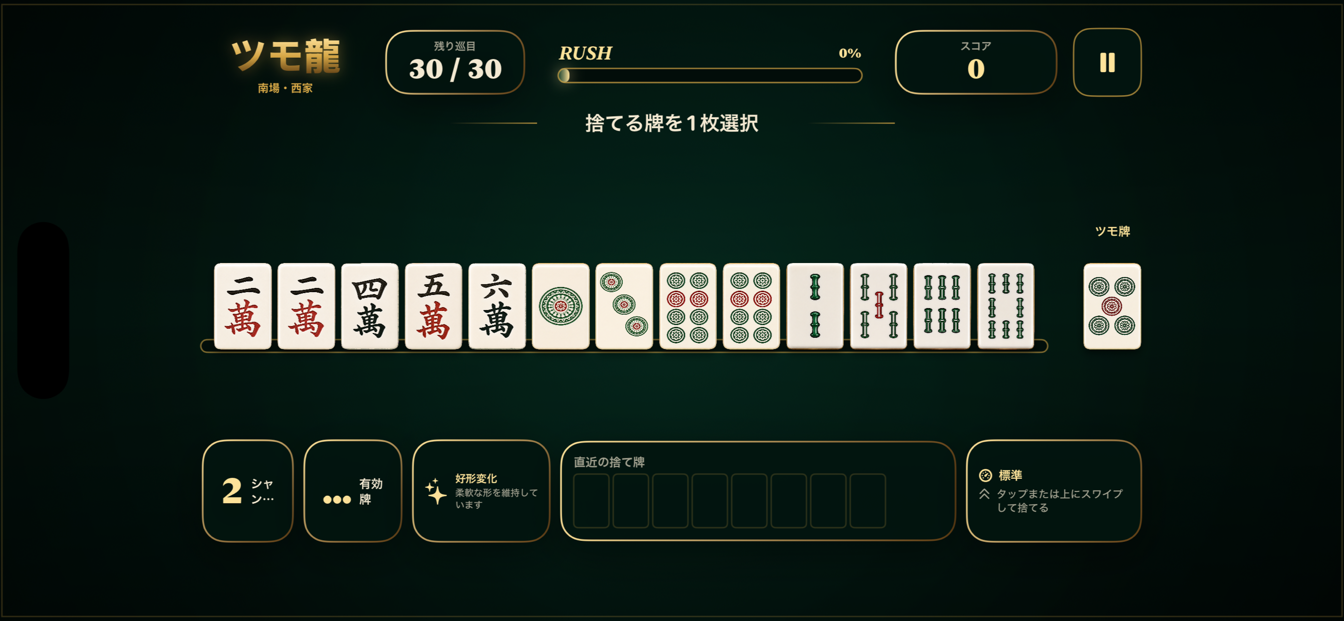
Tsumo Dragon gameplay showing a 13 tile hand and separate drawn tile

13 + 1

A clear path through every turn

Tsumo Dragon keeps the rules legal and the decisions focused.

01

Read the hand

Shanten shows distance from tenpai. Useful tiles show how many remaining tiles can improve the hand.

02

Choose a discard

Tap once to select. Tap again or swipe up to discard. The drawn tile remains visually separate from the 13-tile hand.

03

Build RUSH and win

Efficient choices raise RUSH. Tenpai receives a clear cue, and a winning draw is shown separately before results.

FAQ

Frequently asked questions

Purchase and device questions, without the fine print maze.

What happens after my 10 free games?
You can still open settings, records, the yaku collection, and achievements. Starting game 11 opens the Full Game purchase screen. Game 10 is never interrupted and its result remains available.
How do I restore my purchase?
Open Settings or the Full Game screen and choose Restore Purchases. Use the same Apple ID that made the purchase. Purchases are verified by Apple through StoreKit.
Does continuing a game use another free game?
No. A free game is counted only after a new legal game is created and saved. Returning to the same active game does not count it again.
Where are my records stored?
Game progress, settings, records, achievements, and yaku history are stored locally on your device. Tsumo Dragon does not require an account.
The game has no sound or haptics. What should I check?
Open Settings and confirm Music, Sound Effects, and Haptics are enabled. Also check your iPhone volume, Silent Mode, and any connected audio device.
Which devices and orientations are supported?
Tsumo Dragon is designed for iPhone and optimized for landscape play. Keep iOS updated for the best StoreKit, audio, and accessibility behavior.

Still need help?

Email us with your iPhone model, iOS version, app version, and a short description. Do not include payment card details or Apple ID passwords.

Email support